Euler · Web
Euler: DeFi Lending and Borrowing
Led research, usability analysis and interface design for DeFi lending and borrowing across wallet, market, transaction and mobile flows.
- Role
- Senior UX Designer / Research Lead
- Scope
- DeFi lending and borrowing experience
- Focus
- Web
- Designer
 Gideon Awolesi
My contribution · Euler
DeFi lending and borrowing experience
I used the research to simplify decisions around collateral, risk, and completion, then tested the lending and borrowing flows on desktop and mobile.
- 12
- interviews
- 200+
- survey responses
- 2
- usability-test rounds
What I owned
- 01Ran research and workshops to identify where DeFi users dropped off.
- 02Simplified lending and borrowing decisions around risk, collateral and completion.
- 03Made transaction states clearer on desktop and mobile.
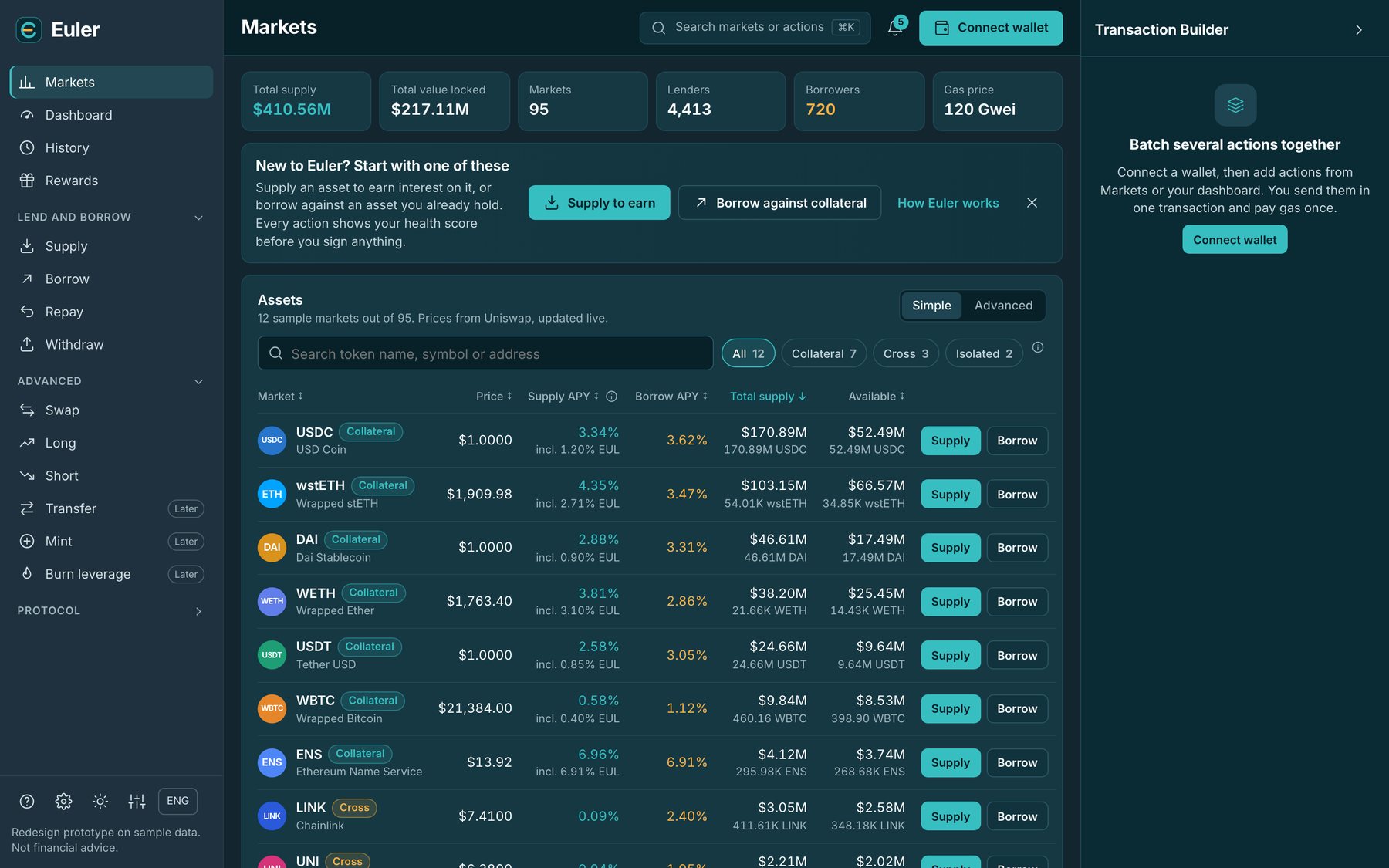
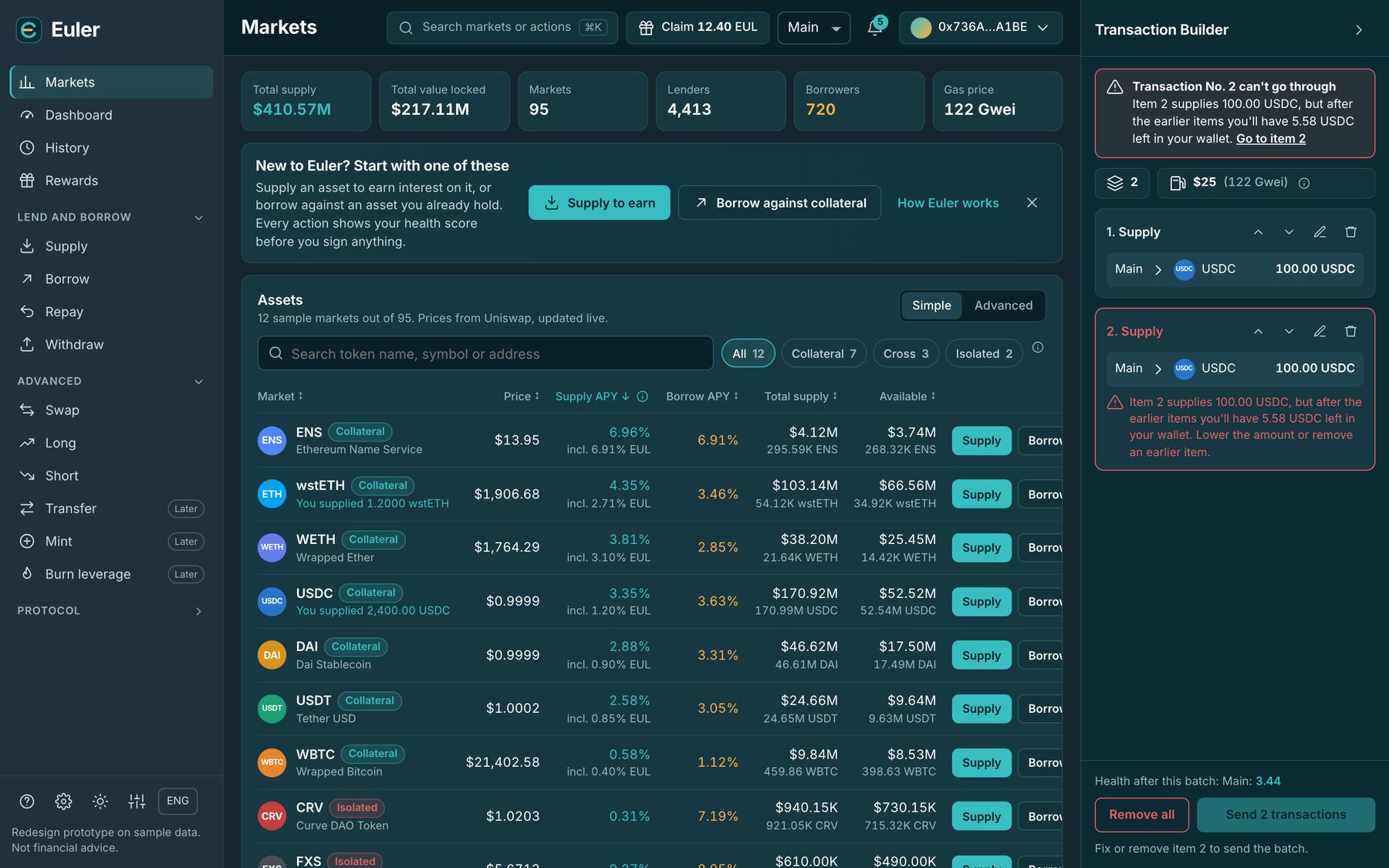
Clickable prototype
Open the redesigned Euler lending app
Connect the sample wallet and supply or borrow with a live health score. Then queue your actions in the Transaction Builder and sign them as one transaction.
Overview
About the project
- Role: Senior UX Designer and Research Lead. I was the only designer on the project, so I ran the research, the competitive audit, the persona work, the wireframes, the usability tests, and the documentation for engineering.
- Platform: Euler, a DeFi lending and borrowing protocol.
Euler is a non-custodial protocol on Ethereum. People supply crypto assets to earn interest, and they can borrow against the assets they've set as collateral. Every asset is in a risk tier, Collateral, Cross, or Isolated, and each account has a health score. If the health score falls below 1.0, the position can be liquidated.
- Objective: Make onboarding, market selection, risk review, and transaction completion easier to understand.
- Team and timeline: I worked for six months with two product managers, four engineers, and one QA specialist.
- Outcome: With the marketing team, we set a target of increasing returning weekly active users by 10%, and we hit it. In 2026, I went back to my original designs and rebuilt the lending and borrowing flow as a clickable coded prototype, from connecting a wallet to signing the transaction.
Prototype
- Interactive prototype: /prototype/euler/. You can browse the markets without a wallet, connect a sample wallet, and then supply, borrow, repay, and withdraw across two sub-accounts. Every action shows your health score before and after, and you can queue several actions in the Transaction Builder and send them as one transaction. Prices, rates, and gas update live, and the protocol activity feed adds new transactions while you watch.
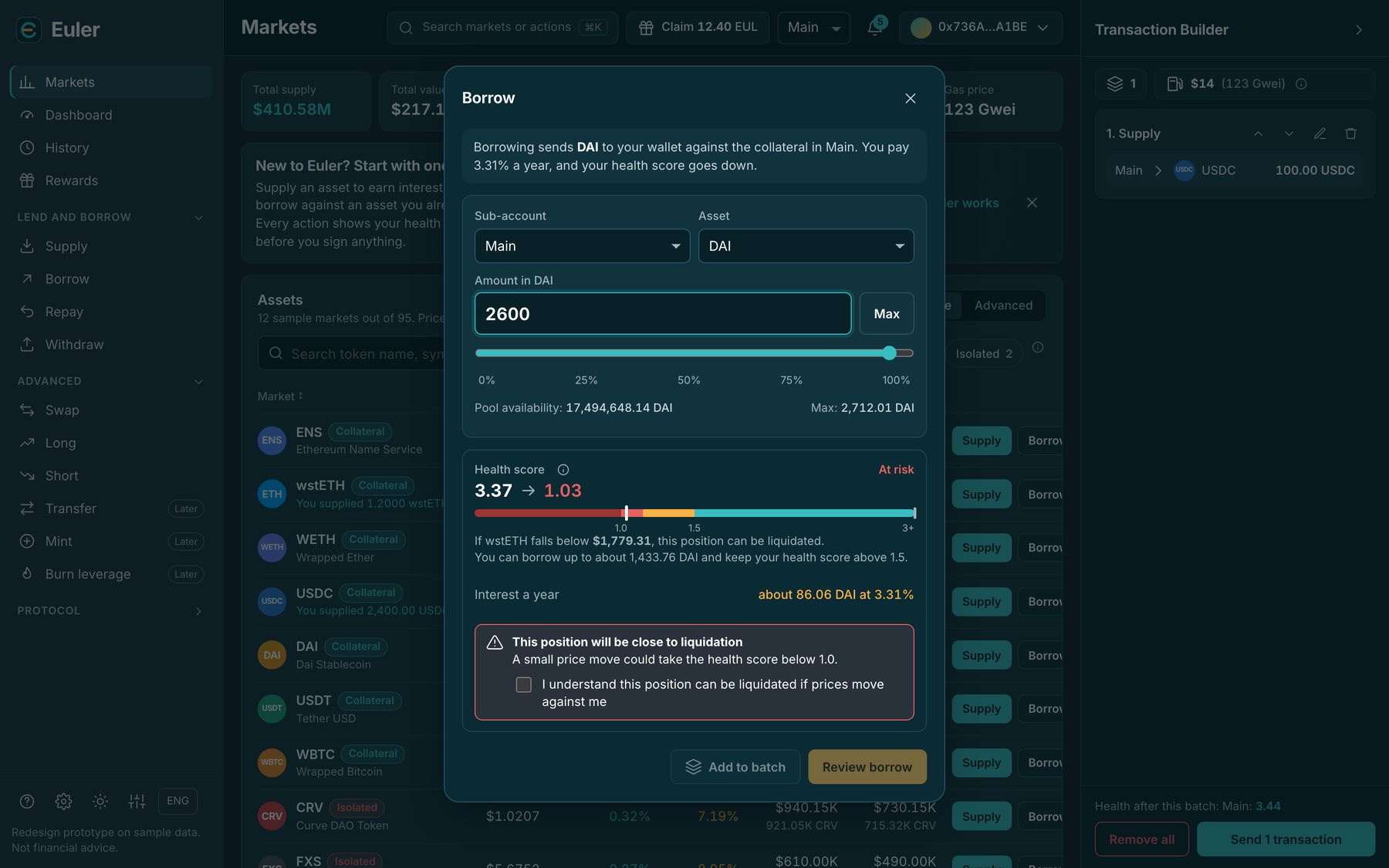
- Try this: Sort the markets by supply APY and open USDC. Supply 100 USDC to Main with Use as collateral on, connect the sample wallet when it comes up, and add the supply to the batch. Then open DAI, click Borrow, and drag the amount up until the health score turns red and the liquidation price changes. Close that, add a second 100 USDC supply, and read the error on item 2 in the Transaction Builder. Remove it, send the batch, and confirm it in the sample wallet. After that, open Prototype controls at the bottom of the sidebar and drop the wstETH price by 30%.
The product problem
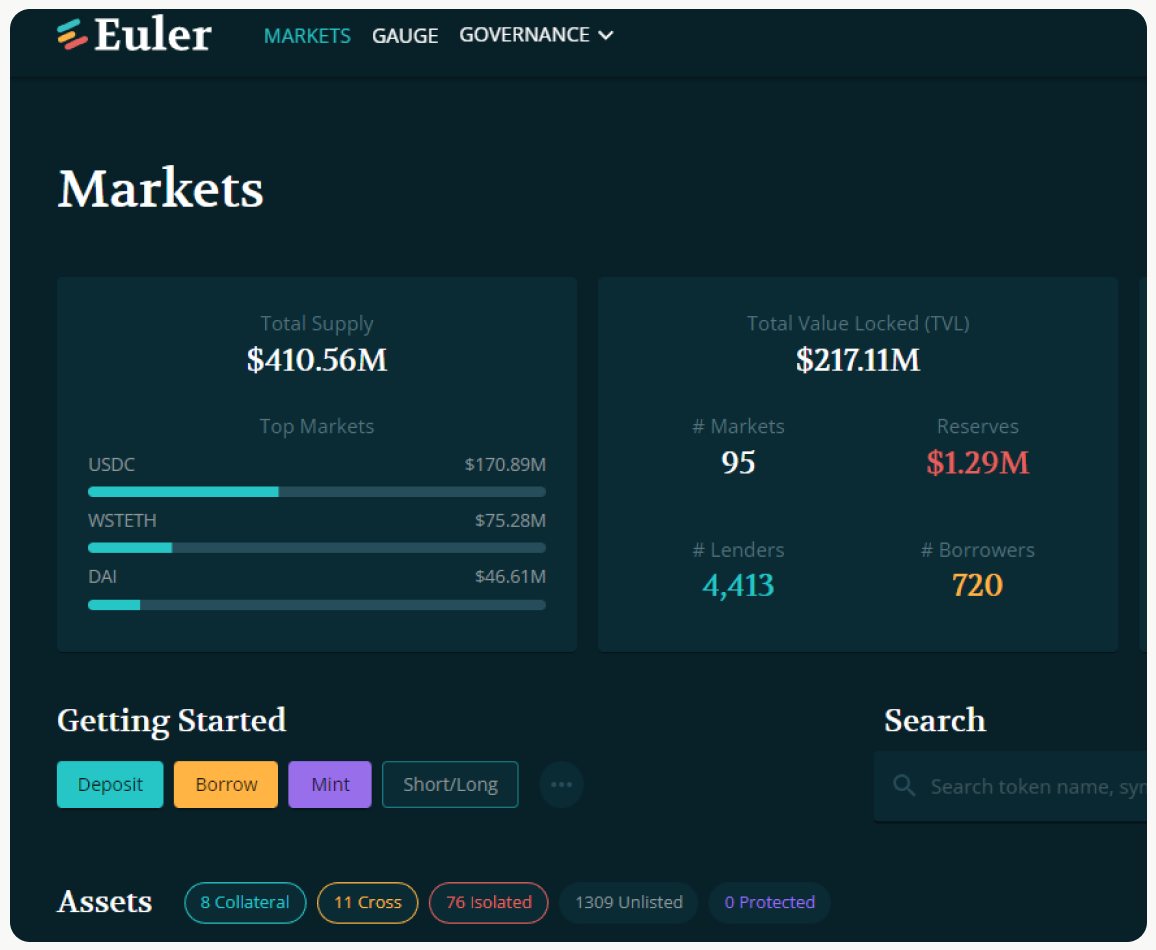
Euler was already a big name in DeFi, with daily volume upwards of 2M USD, but retail users found the dapp very hard to use. The way it was at the time is that the Markets page opened on protocol totals, a row of action buttons with names like Mint and Short/Long, and filter pills for five risk tiers. Someone who'd just bought their first stablecoins didn't know which action to start with, or what any of it meant for their money.
Users were leaving the product because the lending and borrowing flows were hard to understand and hard to complete.
The team wanted to bring in retail users with the V2 of the dapp, which was planned for a few months later. That needed user research and testing first, and then a redesign based on what the research and the competitive audit found. That's where I came in.
Goals and success metrics
I started with a team workshop to agree on the research questions, the problem statement, and the measures we'd use to judge the work.
- Onboarding: Google Analytics showed a lot of users leaving early, so we focused on the questions and decisions that stopped new users from getting started.
- Transaction completion: Some users who got past the landing page still dropped off during the core lending and borrowing flow.
- Retention: With the marketing team, we set a target of increasing returning weekly active users by 10%, and we hit it.
That way, product, design, and engineering all measured progress the same way.
Kickoff and user research
First, I needed to understand where newer and experienced DeFi users read risk differently, and where both groups got stuck.
I used a design thinking approach and split the research into two parts. With the surveys, I could collect feedback from a wide range of DeFi users. In the interviews, I watched people use the dapp and asked them why they hesitated.
I ran 12 interviews with newer and experienced DeFi users. We also ran two online surveys and got responses from more than 200 people we recruited through the project's Discord community.
I put image variations of parts of the dapp into the surveys, so people could compare two versions of a screen as well as answer the questions. In total, 214 people answered, and 38% of them had used a lending protocol for less than six months.
The interview group came from survey respondents who wanted to test the new version before it went live. Seven of them were newer users, and five were experienced.
Partners with a large financial stake in the protocol also joined individual interviews, so the research heard from everyday users and from high-value participants.
- First use: A lot of the users said they were scared to use the platform the first time they opened it. In the survey, 61% said they'd hesitated before their first deposit on Euler.
- Funds: People couldn't follow what was happening with their money after a deposit. In the interviews, 9 of the 12 participants couldn't name the market their deposit was earning interest in, or say that it could be used as collateral.
- Next step: Users didn't know which step came next, because the screens didn't have a clear call to action. They also wanted a clearer style for executing orders.
- Health score: The health score decides if a position can be liquidated, but it was also the number people understood least. Only 3 of the 7 newer users could explain what would happen if it fell below 1.0.
- Action names: When I showed both labels, 72% of survey respondents picked “Supply to earn interest” over “Deposit”. 58% said they'd never used Mint or Short/Long, because they didn't know what the buttons would do.
- Help: 44% of survey respondents said they'd looked for help inside the dapp and couldn't find it.
These are the four quotes I kept coming back to, from the survey comments and the interviews: “I don't understand what is happening with my money. Where is it going to?”, “There are so many things here, I don't even know where to start”, “I just deposited, I don't know what next to do”, and “The button to deposit is not working, how do I contact support?”
Competitive audit
I added the main competitors to the survey and asked people to pick their favourite. Compound, Aave, and Maker came out on top, so I compared Euler with those three on transparency, usability, ROI, support, and feedback.
Euler only had a tick for ROI. Compound had ticks for four of the five, and it was the only one of the four with a tick for both transparency and usability. So the returns on Euler were competitive, but people couldn't see what the product was doing with their money.
Users and jobs to be done
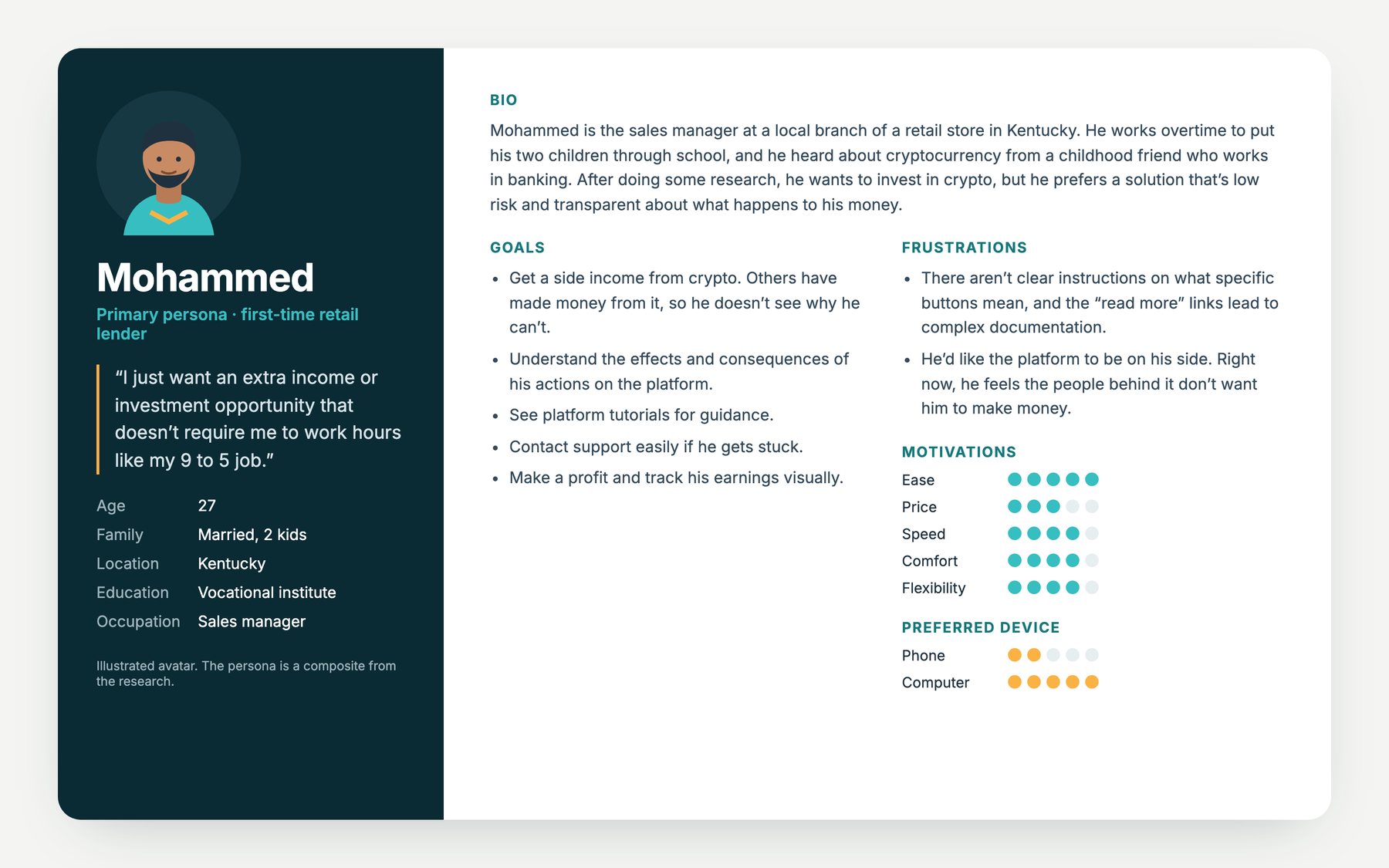
I wrote a primary persona from the research. Mohammed is 27 and a sales manager at a retail store in Kentucky. He's married with two children and works overtime. He heard about crypto from a childhood friend who works in banking, and he wants a low-risk side income that's transparent about where his money goes. He'd rather use a computer than his phone for this. His frustrations came straight from the interviews: he couldn't find clear guidance on what the buttons mean, the “read more” links led to complex documentation, and he felt the platform wasn't on his side.
I designed for four jobs to be done.
When I have stablecoins in my wallet, I want to put them to work and see what they'll earn, so I can grow my savings without watching charts all day.
When I need cash but don't want to sell my ETH, I want to borrow against it and know how far the price can fall before I'm liquidated.
When I'm building a position across several steps, I want to queue the steps and send them in one transaction, so I pay gas once.
When a transaction fails, I want to know why and what to change, and I want to find help without leaving the dapp.
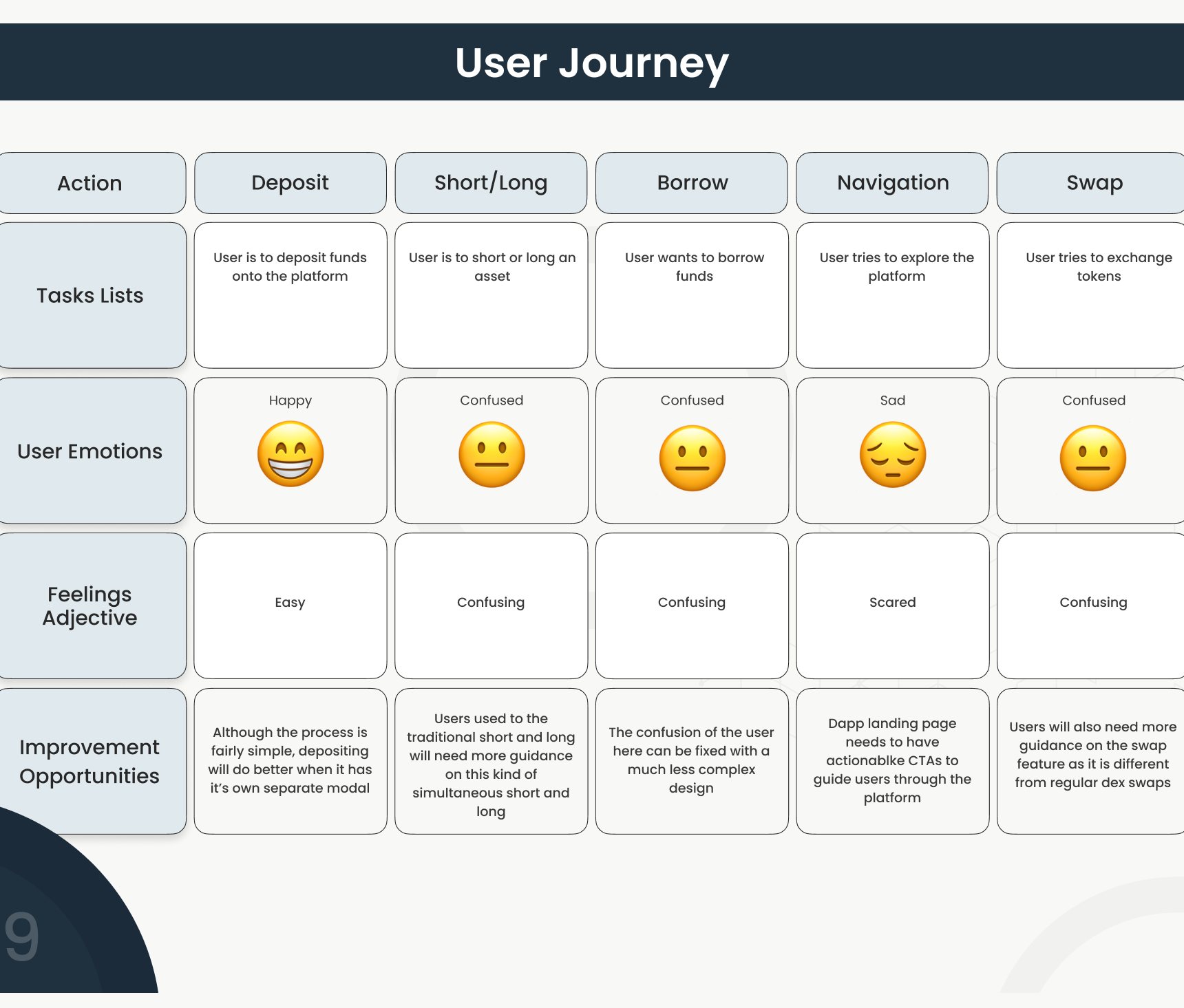
I mapped the journey across five tasks: deposit, short or long, borrow, navigation, and swap. Deposit was the only one people called easy. Short/Long, borrow, and swap were all confusing, and exploring the dapp made people feel scared. I wrote an improvement opportunity for each stage. For example, depositing needed its own modal, and the landing page needed actions that would guide a new user through the platform.
Reviewing each stage of the flow
I led workshops with product and engineering where we went through each stage, from the landing page to loan repayment.
Information architecture: I rebuilt the structure around one decision after the wallet connects. People with an active position go to their assets dashboard, and people without one go straight to deposit and sign their first transaction. Everything else is in the header, the sidebar, the overview, or the footer, where support and tickets are.
From wireframes to prototype
- Low-fidelity wireframes: I mapped onboarding, lending, borrowing, and loan management, and paid particular attention to navigation and the order of information.
- Mid-fidelity designs: I added the visual system and placed explanations beside unfamiliar DeFi terms and decisions.
- High-fidelity prototype: I built the main flows in Figma and added contextual guidance. The community asked for a dark theme, so I included one.
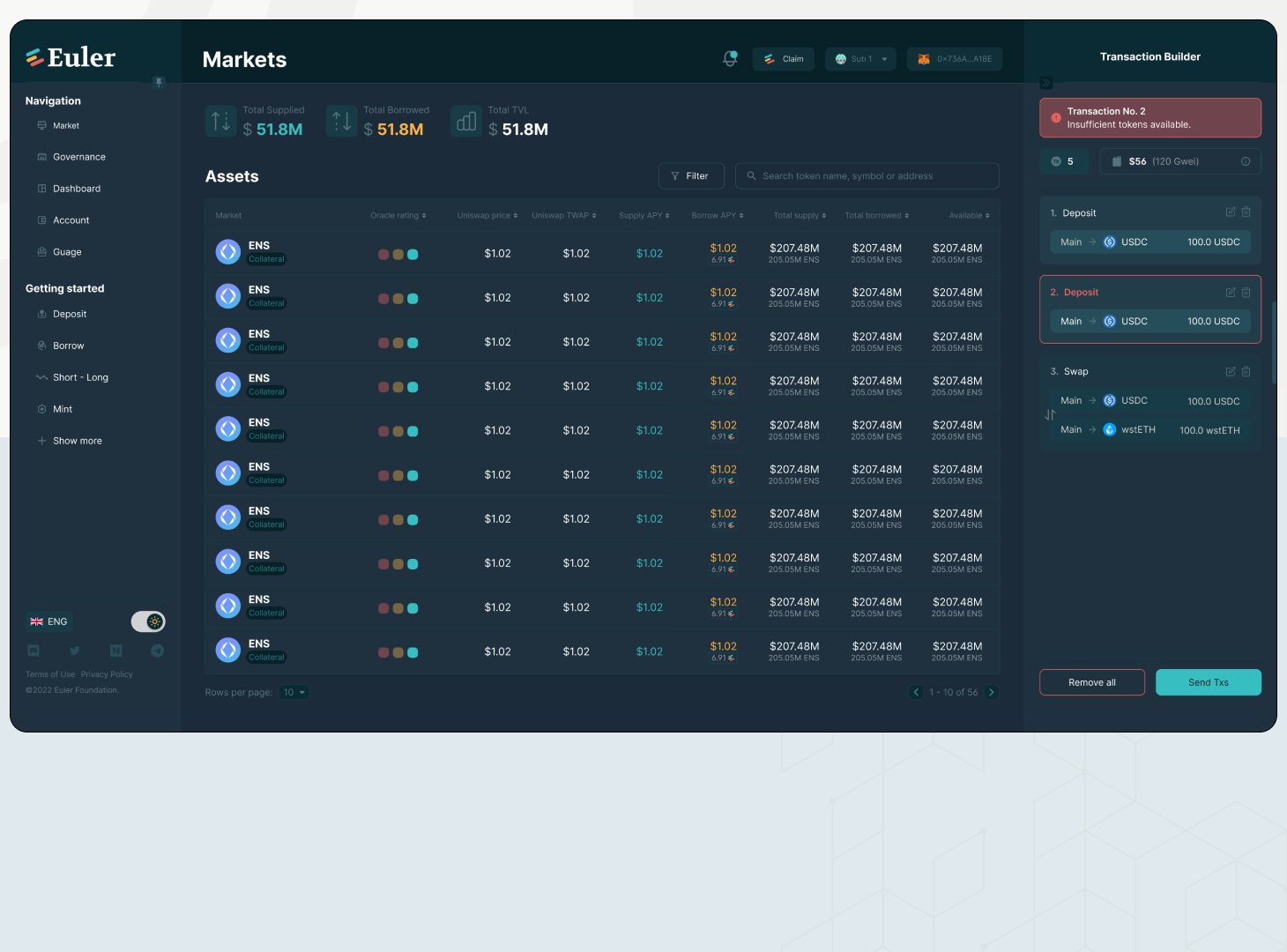
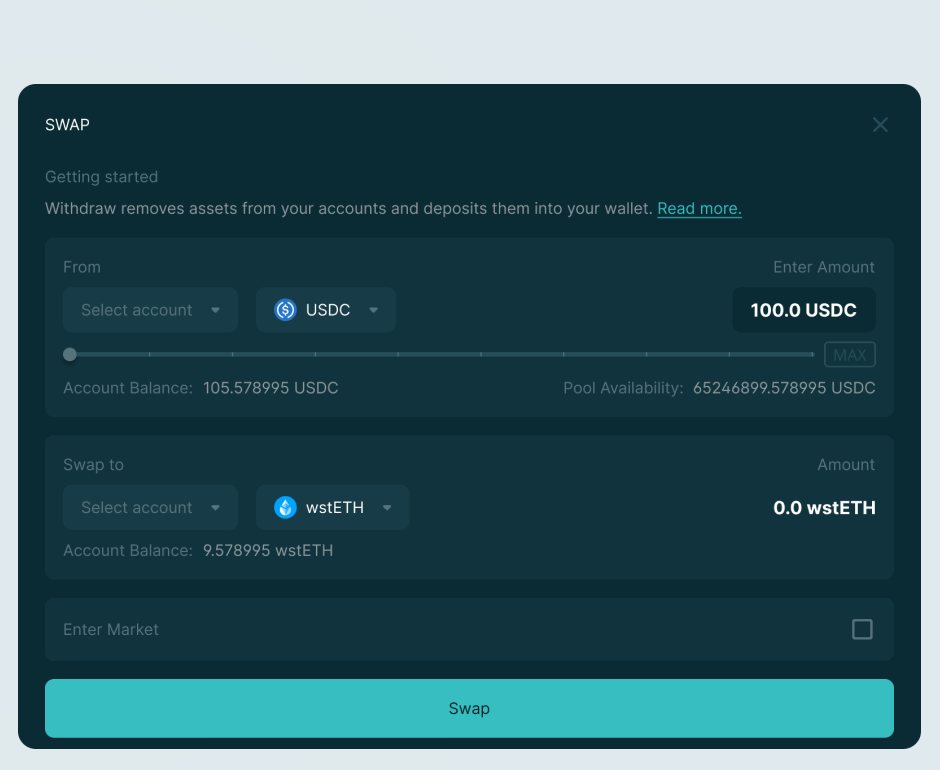
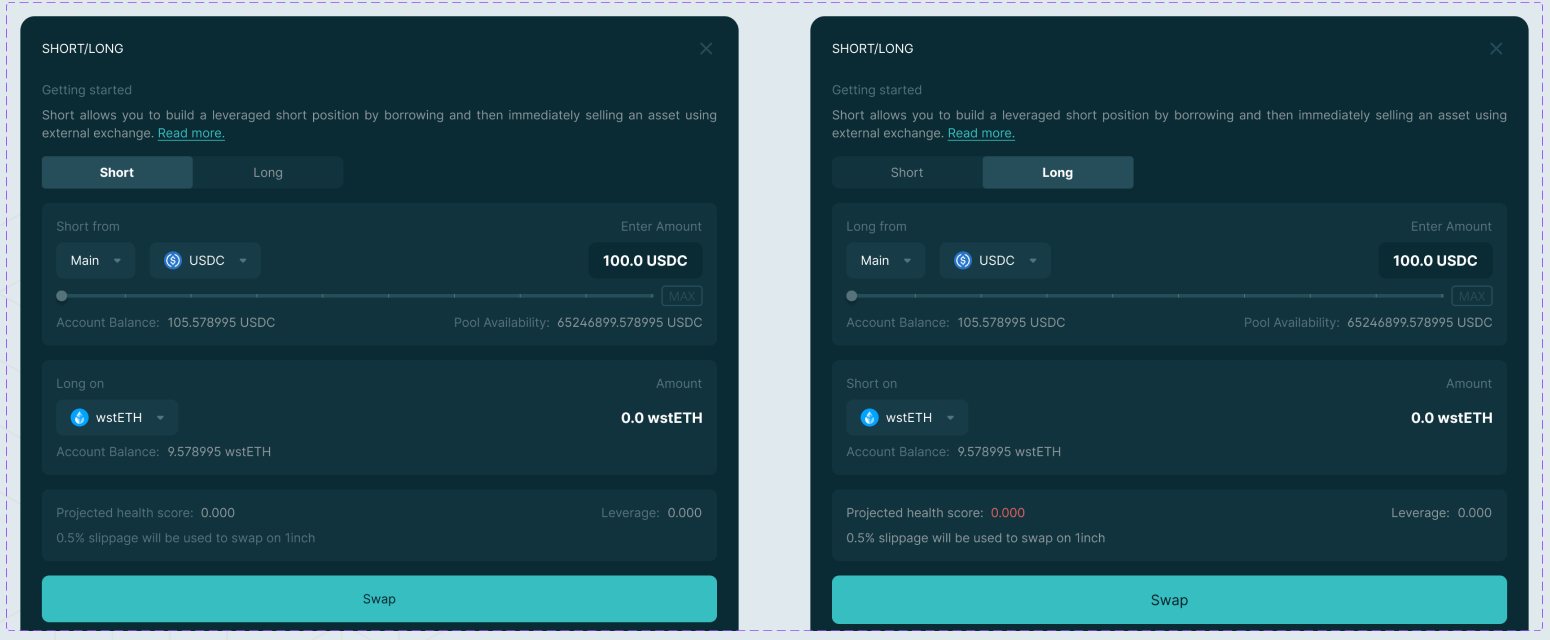
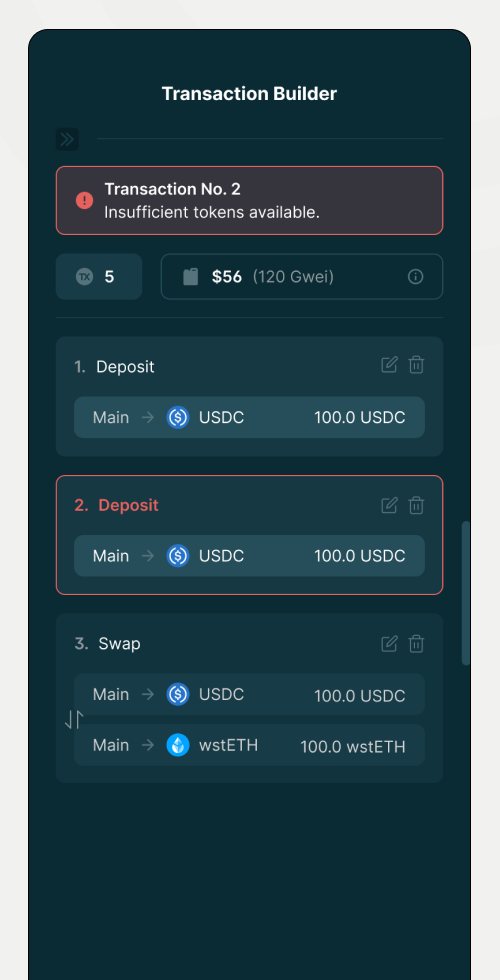
The high-fidelity work covered the Markets screen with a sidebar for navigation, the action modals for swap, short, and long, and the Transaction Builder. The Transaction Builder is a panel where you can queue a deposit, a swap, and a borrow, see the gas estimate, and send them as one batch. If one of the queued items can't go through, that item is marked in red with the reason.
The first round of testing showed that the mobile inputs were cramped and the top navigation was overloaded. Before the next prototype review, I made the tap areas bigger and simplified the navigation.
Two rounds of usability testing
- Round one: Eight participants went through moderated remote sessions with the first design. I tested navigation, clarity, and trust signals.
- Round two: I revised the tooltips and data displays, and then compared a detailed layout with a simpler version. Six participants took part, and five of the six preferred the simpler version, with fewer columns and the action buttons closer to the asset.
- What testing showed: People preferred the version where the call to action matched the task they were doing. They used a few actions over and over and wanted those to be easy to find. They tried new features when the guidance was close at hand, and they got lost when a screen had a lot of information on it at once, so reducing the clutter helped.
In round one, 4 of the 8 participants could borrow DAI against their wstETH without going below a health score of 1.5. In round two, all 6 could, and the average time on that task went from 3 minutes 40 seconds to 1 minute 55 seconds.
User feedback: “The new interface is so much easier to navigate—it finally feels like I’m in control of my funds, rather than the interface controlling me.”
At the end of some flows, I added a short feedback modal, so the team could keep collecting feedback from people using the live dapp after a deposit or a borrow.
Proposed solutions
- Onboarding: Explanations appeared the first time a user came across an unfamiliar feature. Tooltips covered DeFi terms, security warnings, and transaction fees.
- Dashboard modes: Newer users could choose a simpler view, while experienced users could keep the additional data they needed.
- Risk information: Liquidity risk and loan-to-value changes showed up inside the decision flow, and confirmation messages appeared wherever a transaction changed state.
Storyboards and low-fidelity wireframes let the team test these ideas before we spent time on detailed screens.
How I redesigned it
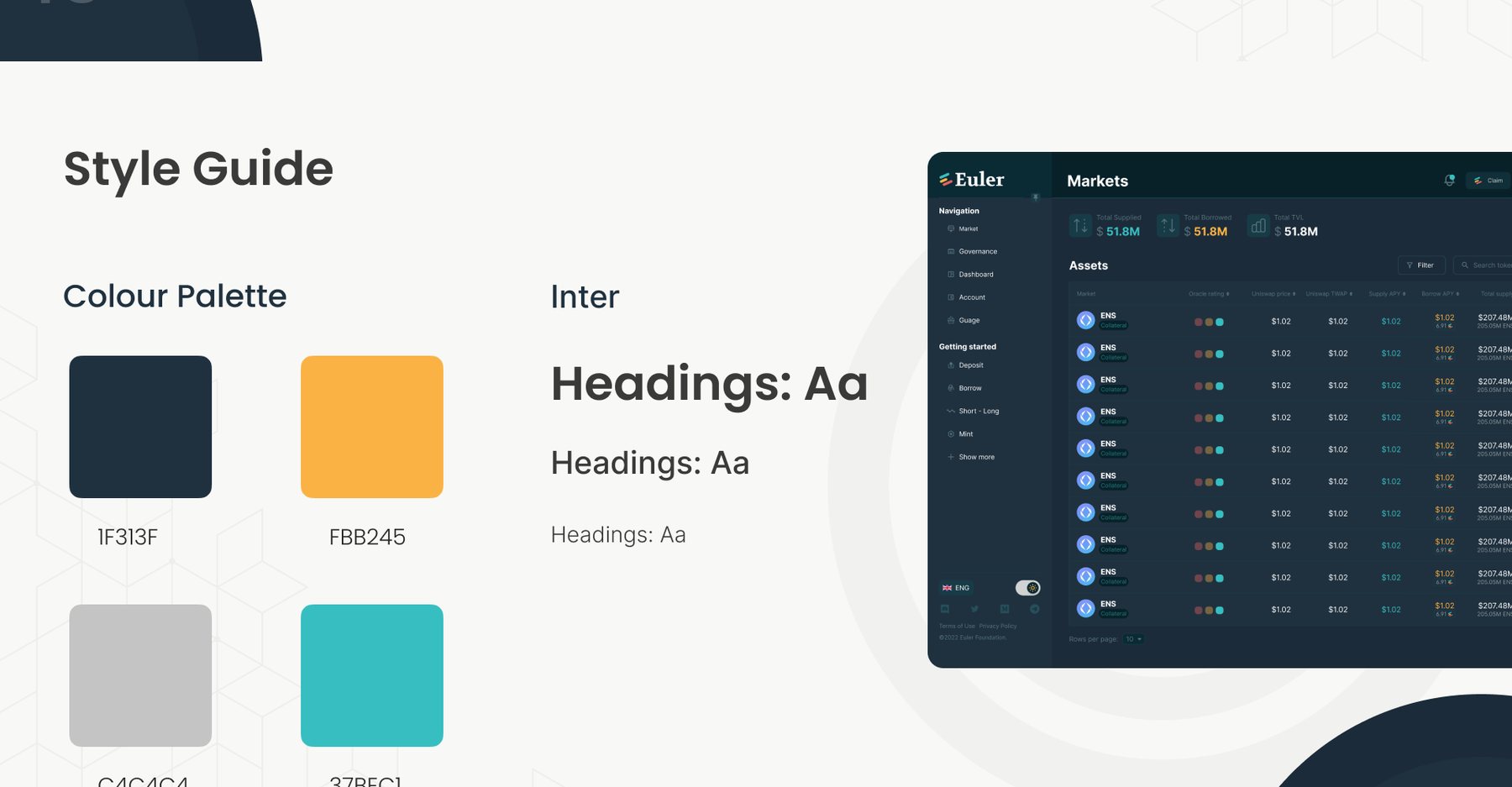
In 2026, I rebuilt the lending and borrowing flow as a coded prototype. I kept the brand from the 2022 work: the navy and dark teal surfaces, teal for supplying and primary actions, amber for borrowing, and Inter for the interface. I drew a simple new mark for the prototype instead of using the Euler logo. The rest of the changes came from going back through the 2022 screens with the research findings next to them.
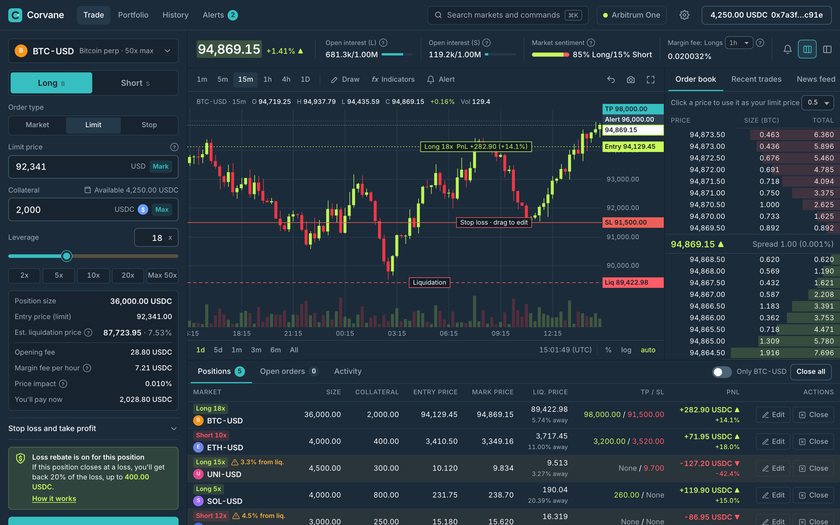
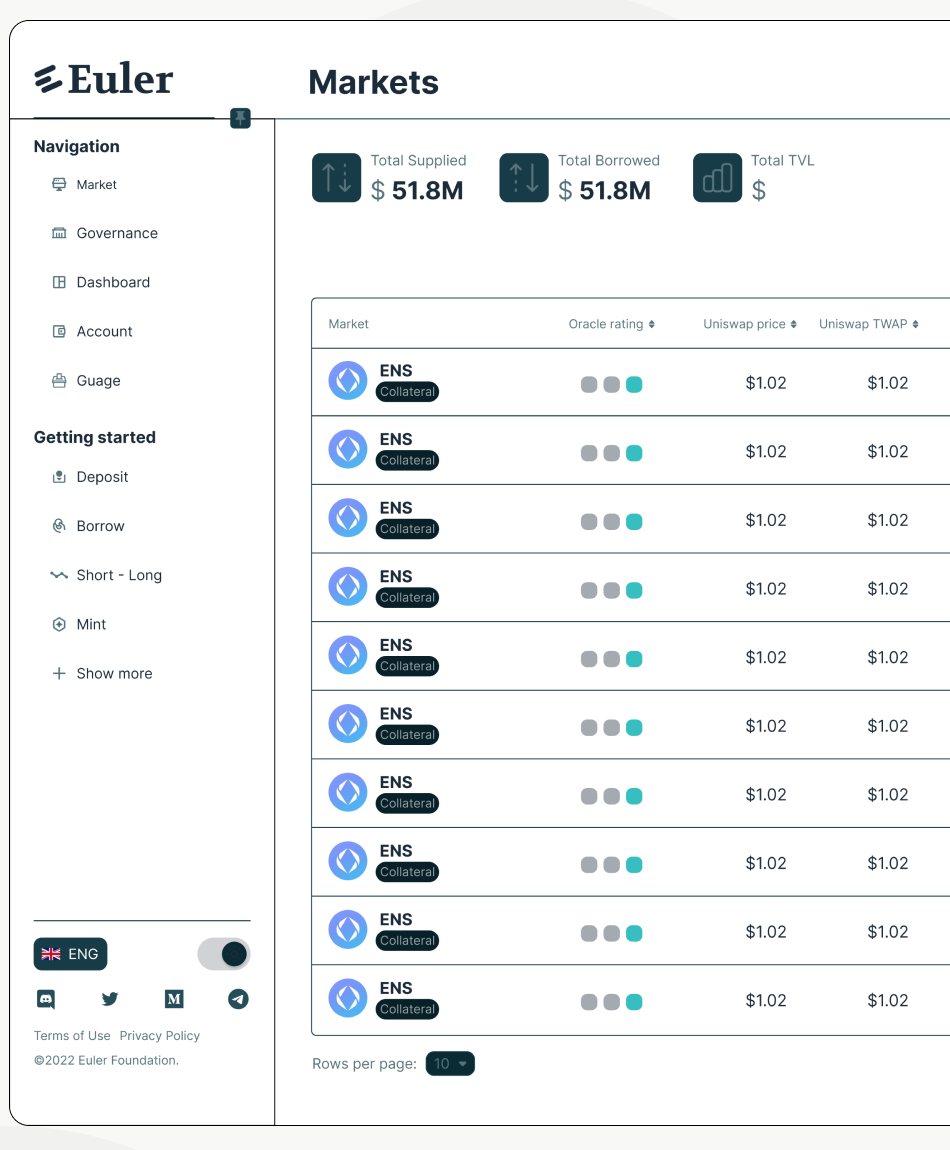
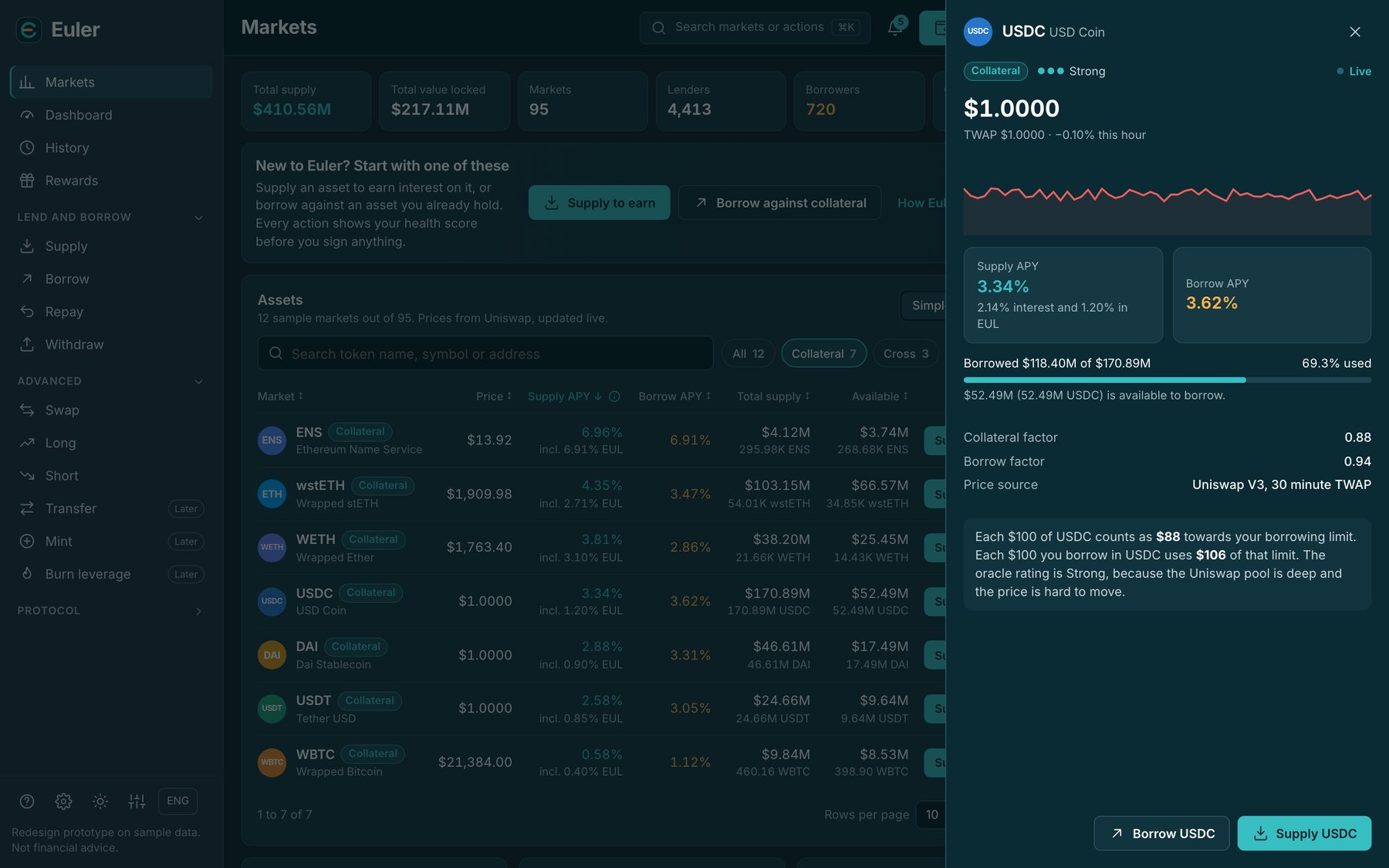
- Market data: In the original high-fidelity Markets screen, every row was the same placeholder, ENS at $1.02, and the three totals all read $51.8M. With identical rows, you can't judge the visual hierarchy of the table, because real markets differ by orders of magnitude. In the redesign, the table has sample data for twelve markets across the three tiers, with tabular figures and a sensible number of decimals for each asset, so you can compare supply and borrow rates at a glance. Prices, APYs, and gas update every couple of seconds, and the activity feed under the table adds new supplies, borrows, and liquidations as they come in.
- Oracle rating: The original showed the oracle rating as three coloured dots with no label. The meaning depended on colour alone, so you couldn't read it without a legend, and it wouldn't work for people with colour blindness. In the redesign, the rating is written out as Strong, Medium, or Weak next to the dots. In the market detail, I added a short explanation of where the price comes from, and why a weak rating puts an asset in the Isolated tier.
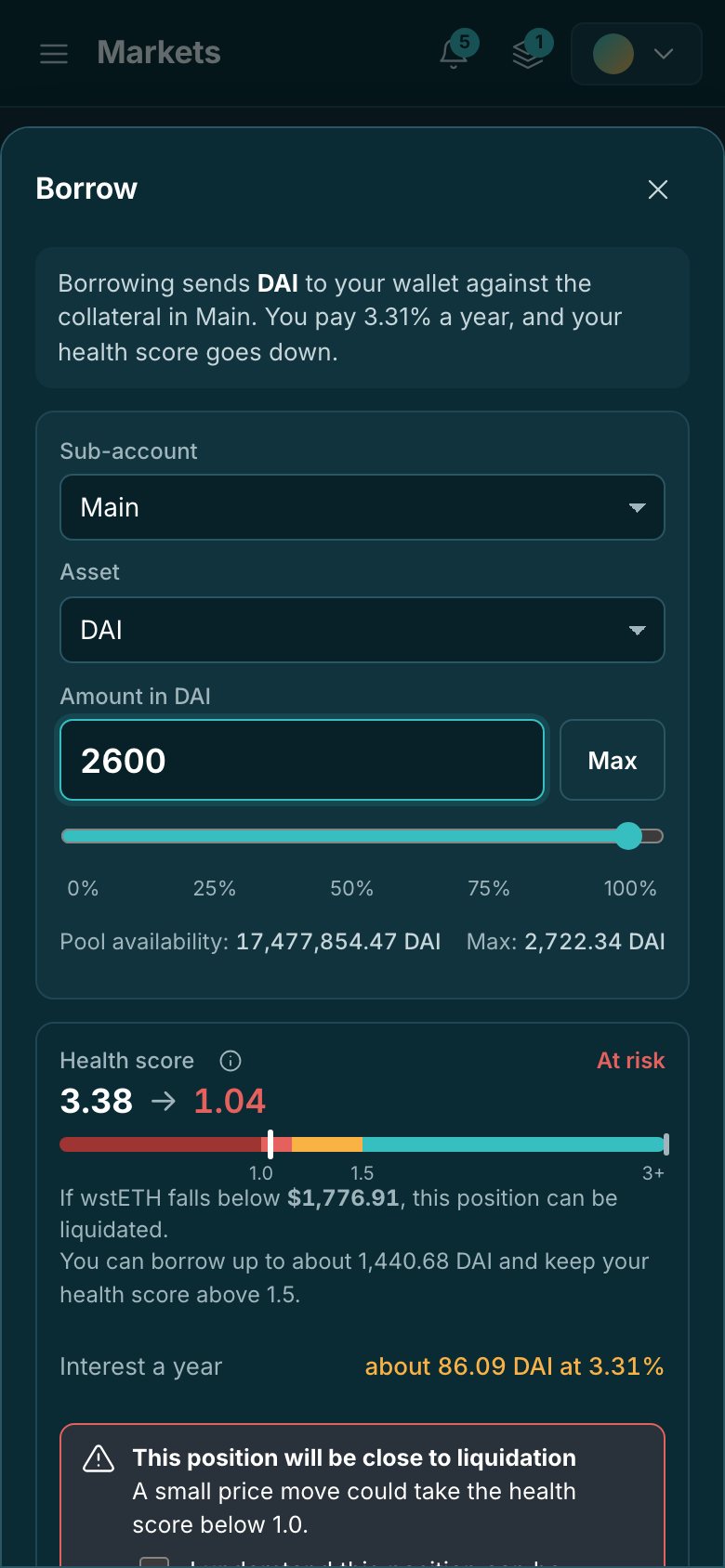
- Health score: In the Short/Long modal, the projected health score was a small grey 0.000 at the bottom of the form. That's the one number that decides if a position can be liquidated, so it has to be the first thing you see when you decide how much to borrow. In the redesign, every action that changes your risk has a health meter with the score before and after, the band it falls into, and the price at which your collateral could be liquidated. You can't submit an action that takes the score below 1.0, and anything below 1.15 needs a checkbox to confirm you understand the risk.
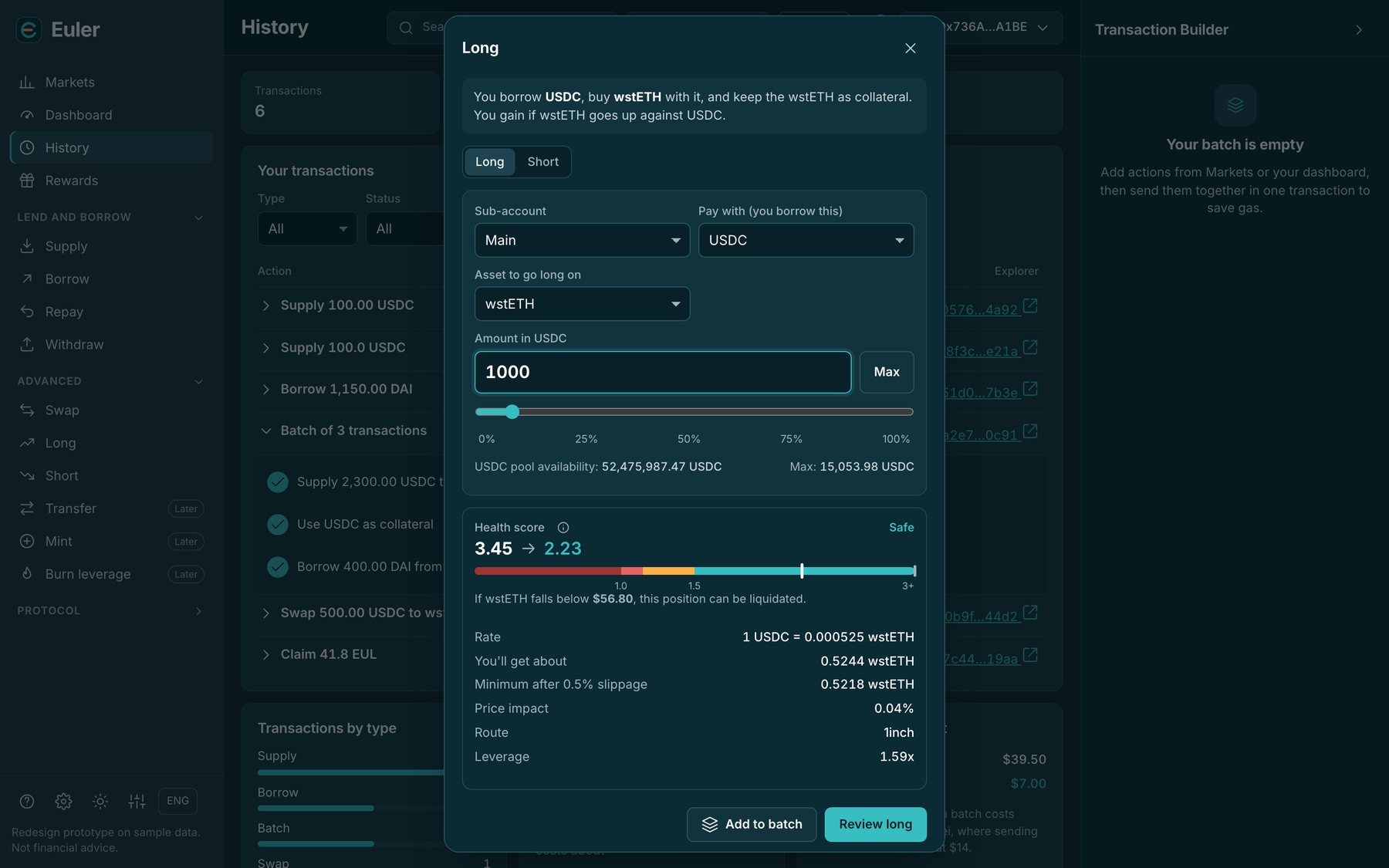
- Action copy: The Swap modal's helper text described withdrawals, the Long tab repeated the Short explanation, and every leverage button said Swap. In the redesign, I wrote one sentence for each modal that explains the action with the assets you've picked, for example “You borrow USDC, buy wstETH with it, and keep the wstETH as collateral. You gain if wstETH goes up against USDC.” The primary button names the action, like Review long or Review borrow.
- Navigation: The sidebar's Getting started list put Mint, Burn Leverage, and Short - Long next to Deposit, and that's exactly what Mohammed's frustration was about. In the redesign, the sidebar has a Lend and borrow group with supply, borrow, repay, and withdraw, and an Advanced group for swap, long, and short. Both groups collapse, and the tools that aren't in this prototype are marked Later.
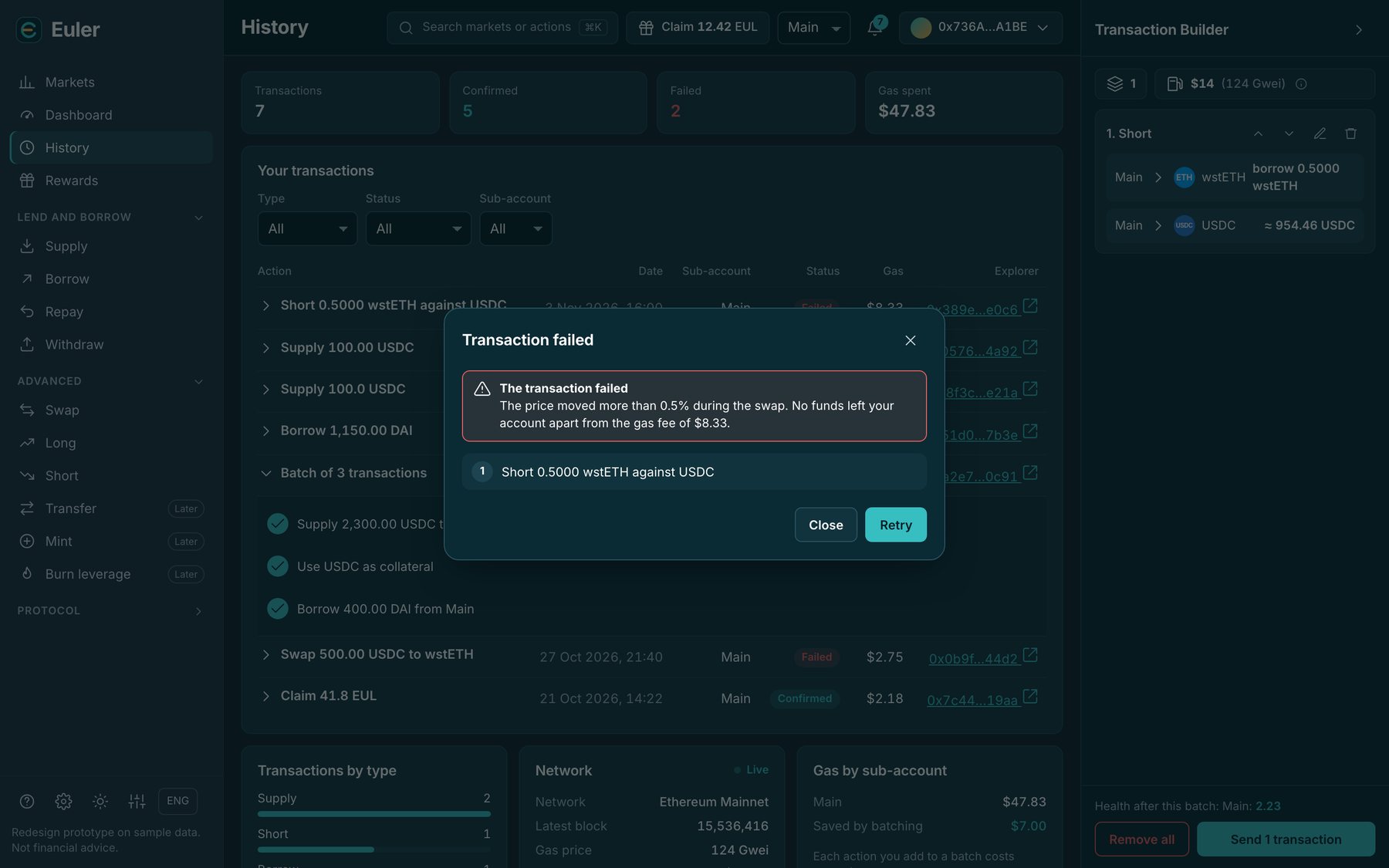
- Transaction Builder: The original error banner read “Transaction No. 2 / Insufficient tokens available.”, and the Send button stayed active. In the redesign, the Transaction Builder checks the items in order, the same way the chain would run them. The failing item shows how much you'll have left after the earlier items and what to change, and the Send button is disabled with the reason underneath until every item is valid. You can reorder items by dragging them or with the arrow buttons, edit them, and undo a removal. The panel also has the health score after the whole batch, and a gas estimate that follows the live gas price.
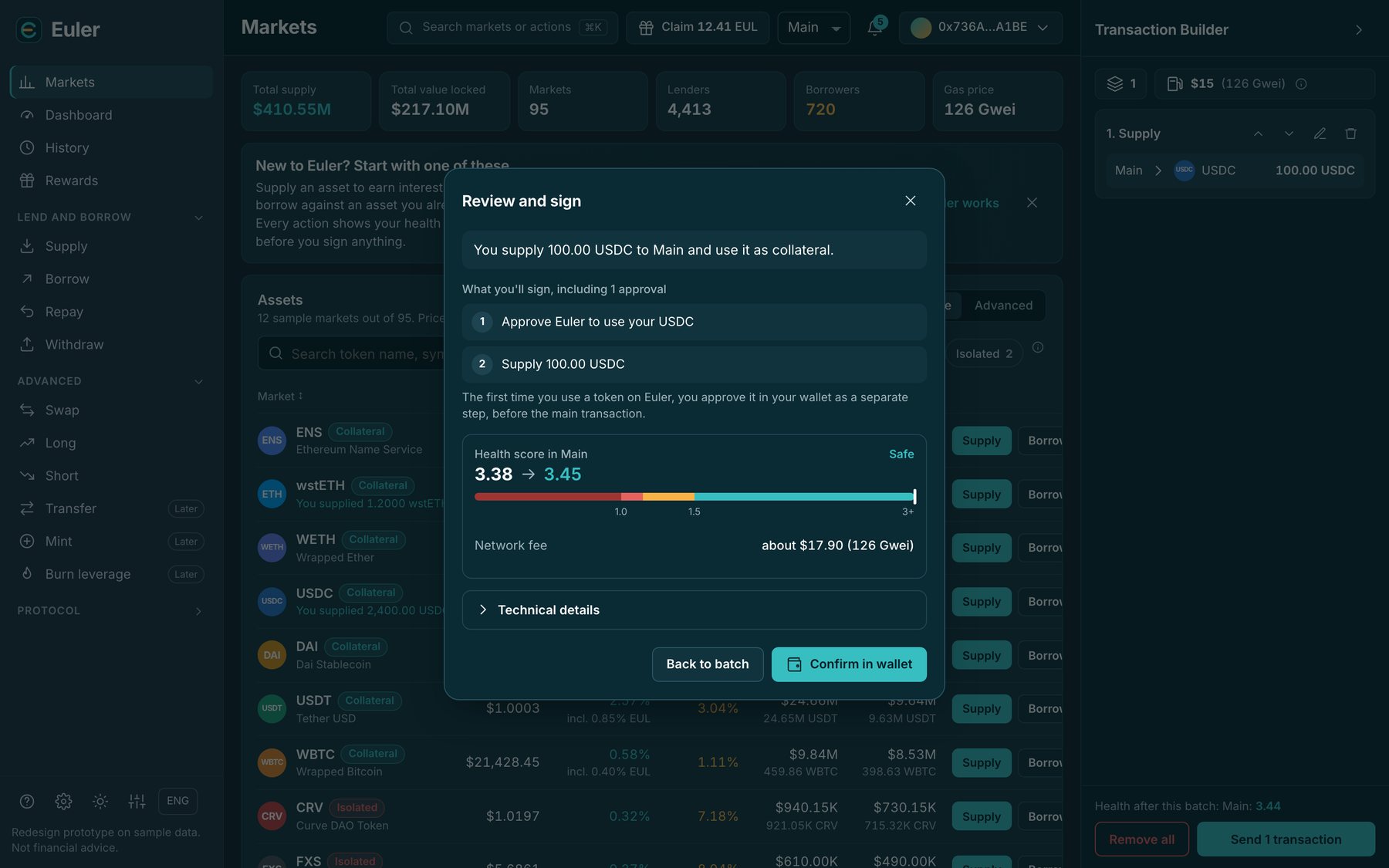
- Review and signing: The 2022 work stopped at the Send button, even though the user flow had a Sign Tx step. In the redesign, the review starts with a plain summary of what you're doing, like “You supply 100.00 USDC to Main and use it as collateral.” Below that are the steps you'll sign, including a token approval the first time you use a token, and the health score before and after. It's important that the gas, the contract, and the slippage are still there in a Technical details section, for people who are more technically inclined and want to check them. After that come the wallet signature, a pending state, a confirmed or failed state, and a short feedback question.
- Missing states: The original designs didn't have a wallet connection screen, empty states, loading states, or error states. The prototype has all of them, including a cancelled connection, the wrong network, a rejected signature, a swap that fails on slippage, a sub-account with nothing in it, and markets that fail to load. You can trigger each one from Prototype controls at the bottom of the sidebar.
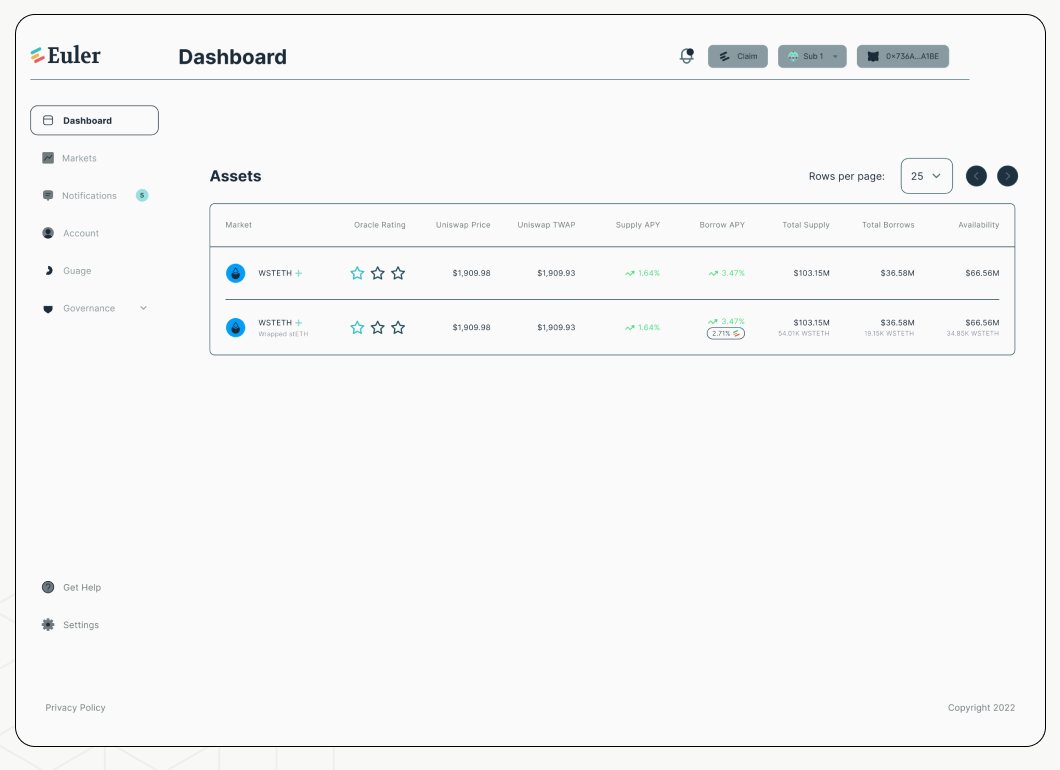
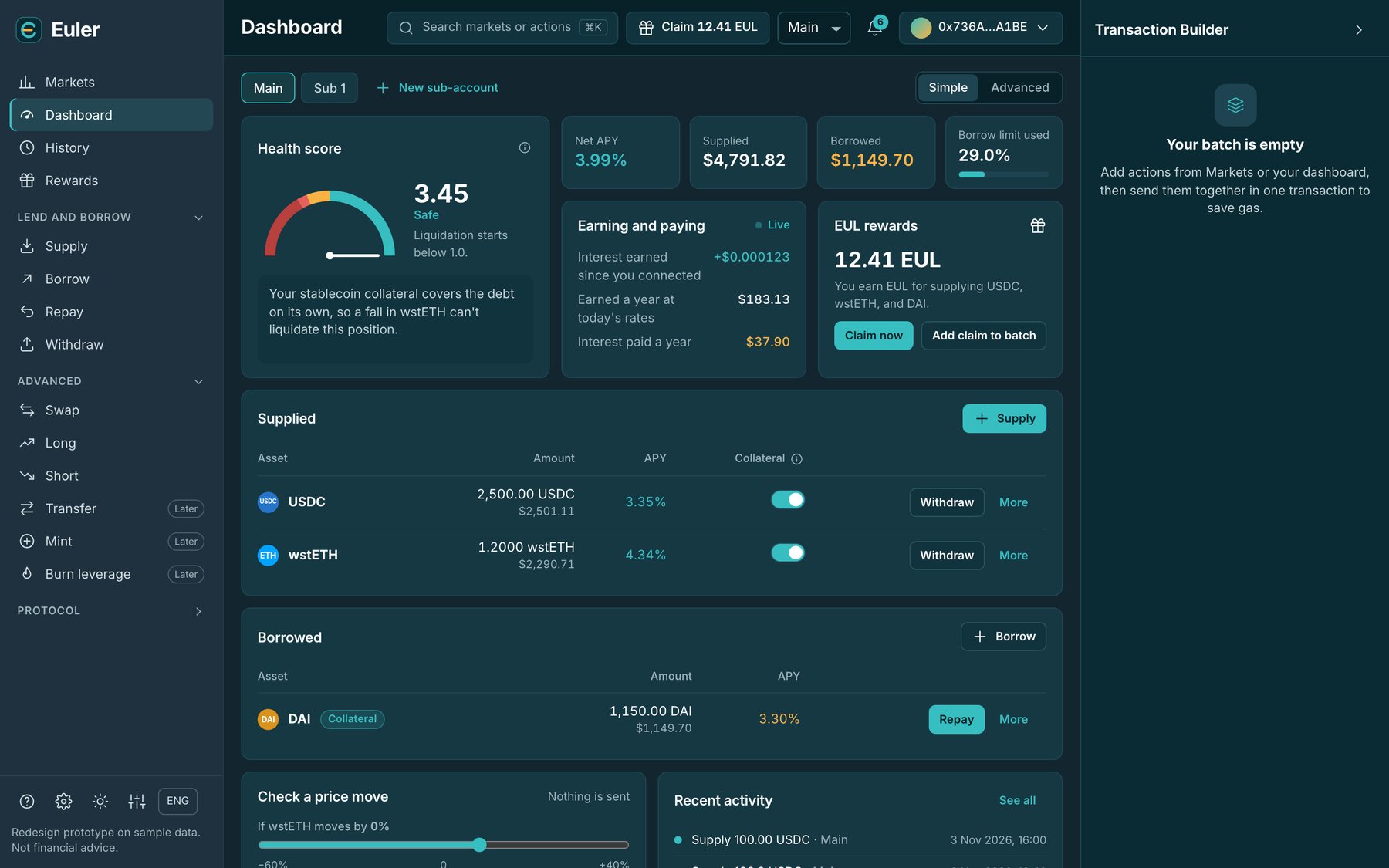
- Dashboard: Each sub-account has its own tab with the health gauge, net APY, the borrow limit used, and the EUL rewards you can claim now or add to the batch. You can turn collateral on or off from the supplied table, and the change goes into the batch. If turning it off would take the health score below 1.0, you can't do it, and the reason is right there. With the price check card, you can move the wstETH price with a slider and read the health score at that price before you send anything.
- Mobile: The 2022 project only had desktop screens, but the first round of testing showed the mobile inputs were cramped. In the prototype, the markets table turns into cards on a phone, the action modals open as bottom sheets with 44 px tap areas, and the Transaction Builder becomes a drawer you open from the tab bar.
What the validation showed
- Validation: The revised flow made onboarding, lending, and borrowing decisions easier to explain and test.
- Onboarding: Contextual help and progressive disclosure dealt with the early confusion we’d seen in the analytics and research.
- Transactions: Risk, collateral, and confirmation states appeared before the user committed to the transaction.
I used the interview data to put the actions people needed first in front of them, and I reworked the visual hierarchy of the Markets screen to cut the clutter, so people could focus on one task at a time.
Lessons: As I moved from the surveys to the interviews, the data became more consistent and I started to see patterns that repeated from one interview to the next. Two things stood out. Retail users weren't interested in the jargon that comes with sophisticated DeFi protocols. They wanted to know how to earn from the platform, and they'd follow the steps if someone guided them through it. The other was feedback. People need a response from the platform at every step, especially the first time they use it, because it cuts down mistakes and builds their confidence.
This case study documents the research and design validation. It does not claim that the redesign caused Euler’s current protocol metrics.
The 2026 prototype is my own redesign. Euler didn't commission it, and it runs on sample data based on the figures in my original designs.






Need this level of detail in your product?
Work through the hard product decisions early.
If you’re a product team, that can mean a focused design, system, or prototype project. If you’re hiring, it’s a chance to look closer at how I work across research, interfaces, and code.